1

When I try to load .wav file I get an error:

Audio file *.wav contains 24-bit audio. Only 8-bit and 16-bit audio data is supported.

Here is my code:

SoundEffect menuSelectionChange = content.Load<SoundEffect>("Sound/Menu Selection Click");
SoundEffectInstance menuSelectionChangeInstance = menuSelectionChange.CreateInstance();

Even if I delete this code I'm still getting this error.

Daniel
  • 159
  • 4

1 Answers1

3

You need to downsample your source audio file.

Digital audio is stored as a series of "samples" ("samples" of what a microphone "hears"). There are 2 aspects to sampling: sample rate, and _bits used per sample_. High quality audio is captured at something like 44100 samples per second.

Each sample is just a number though, so that's where "bits per sample" comes in. You can use 8 bits, (usually as type unsigned char), 16 bits (shorts) or even 24 bits per sample to store the audio data.

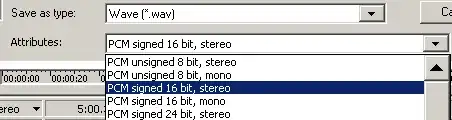
XNA doesn't seem to like 24 bits per sample. So you need to open the file and re-save it as 16 bits per sample.

Goldwave does this nicely

enter image description here

bobobobo
  • 17,074
  • 10
  • 63
  • 96
  • This answer doesn't really touch on the possibility of loading 24 bit sounds (as the question asks). Can you maybe explain why it's not possible or how it might be possible but downsampling is the prefered alternative? – House Jun 23 '13 at 15:19
  • According to the OP, and others XNA doesn't seem to support loading 24 bit audio at all. – bobobobo Jun 23 '13 at 15:23
  • My suggestion was just to complete your answer with that information since it's the title question. Someone looking to load 24bit audio may come here and only see an answer about downsampling, then move on. Might as well explain in your answer how it's not possible in XNA. – House Jun 23 '13 at 15:31
  • :) But I only know this anecdotally. Content.Load doesn't specifically say the type supported. If it comes back as a runtime error, then "just downsample it" is the most I'll say. – bobobobo Jun 23 '13 at 16:09
  • 1
    When you get an error from your framework's content pipeline that states "Only 8-bit and 16-bit audio data is supported" you just have to suck it up and feed it 16 or 8 bit audio. If you want to know why then my best guess is that 16/8 is the least common denominator on hardware supported by XNA and 24 just isn't worth their time because not every platform supports it. – Patrick Hughes Jun 23 '13 at 17:56
  • @PatrickHughes That's not to say future versions of the runtime won't support 24 bit, however – bobobobo Jun 23 '13 at 18:35
  • @bobobobo not so very true, considering that XNA has received its last update and Game Studio will be retired in 2014: http://gamedev.stackexchange.com/questions/22292/what-is-the-future-of-xna-in-windows-8-or-how-will-manged-games-be-developed-in has links and a good list of reasons behind that choice. – Patrick Hughes Jun 23 '13 at 19:02
  • 1
    I know, but now I have to make the obligatory XBox 180 reference to Microsoft being open to completely reversing their stance on things. – bobobobo Jun 23 '13 at 23:17