I found a lot of clues here: https://coderwall.com/p/a8uxma/zsh-iterm2-osx-shortcuts
This is what I put in my .zshrc to fix things.
bindkey "\033f" forward-word
bindkey "\033b" backward-word
bindkey "\033[H" beginning-of-line
bindkey "\033[F" end-of-line
Alongside these terminal keyboard settings:
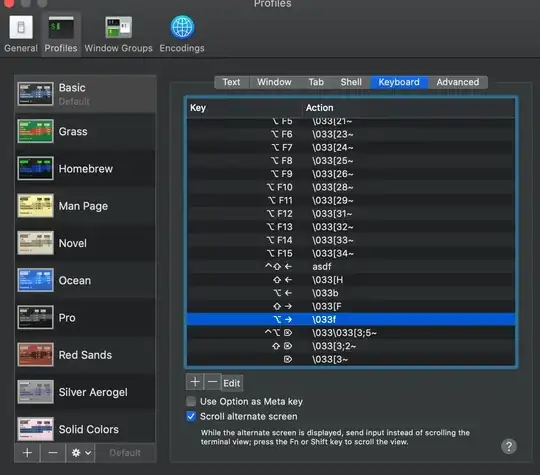
For some reason, the control (^) key modifier can be set, but does not activate the codes in the terminal. So I'm only using option and shift.
I found a similar solution here which mentioned you can see the key codes by running cat. https://stackoverflow.com/questions/12382499/looking-for-altleftarrowkey-solution-in-zsh
Initially I used whatever key codes I wanted. That was a mistake, because even though they worked on my local mac, they didn't work when I SSH-ed into a linux machine. Using less /etc/inputrc on the remote bash I found these existing shortcuts:
# allow the use of the Home/End keys
"\e[1~": beginning-of-line
"\e[4~": end-of-line
mappings for Ctrl-left-arrow and Ctrl-right-arrow for word moving
"\e[1;5C": forward-word
"\e[1;5D": backward-word
"\e[5C": forward-word
"\e[5D": backward-word
"\e\e[C": forward-word
"\e\e[D": backward-word
Also, my local bash had different settings. To find those out I used
bash-3.2$ bind -p | grep of-line
"\C-a": beginning-of-line
"\eOH": beginning-of-line
"\e[H": beginning-of-line
"\C-e": end-of-line
"\eOF": end-of-line
"\e[F": end-of-line
Which made me settle on the terminal keyboard settings you see at the top. Because they worked in all 3 settings (local zsh, local bash, remote bash).


viWhat you have to do is change the key bindings. See if this gets you in the right direction. https://apple.stackexchange.com/q/85757/119271 – Allan Sep 03 '20 at 04:20bash, so you can change the behaviour in.inputrc. Or just start to get used toC-yto get the line back if you delete it by accident :-) – nohillside Sep 03 '20 at 06:49bindkey -r "^[" vi-cmd-modecompletely disables the skipping words functionality – ubershmekel Sep 03 '20 at 15:52